
[AWS] 인스턴스, RDS, 프록시 설정 옮기기 ..
-
한이음에서 서버비를 지원해주는게 아니라 계정을 지원해줘서, 그 계정으로 모든 자원을 옮겨놓으려고 aws에서 도메인 구매 후 인증서도 받아놓았다.
-
원래 쓰던 계정에서 AMI 생성, 스냅샷
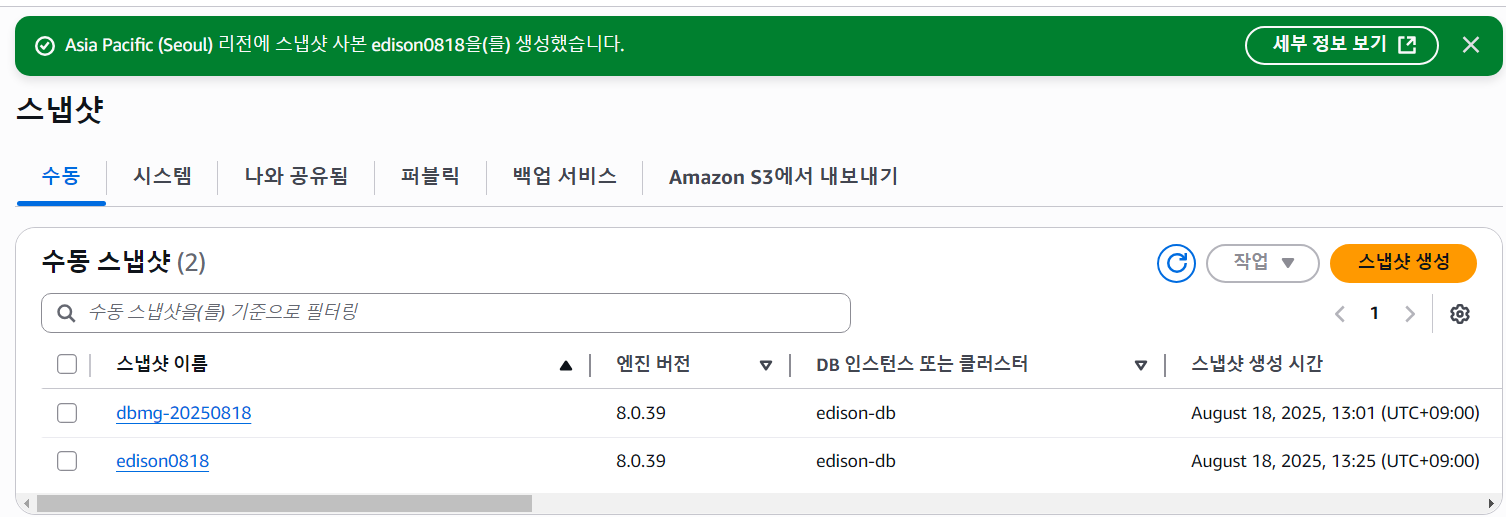
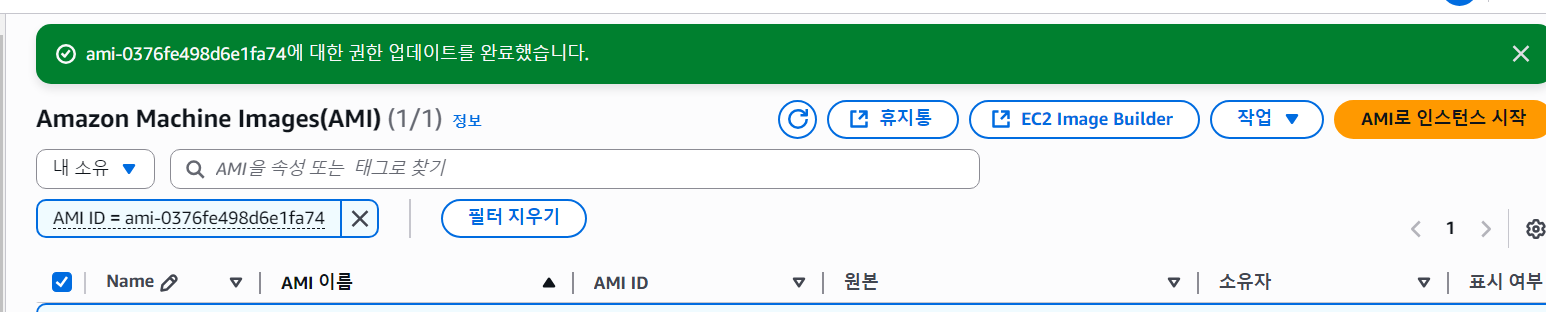
- DB랑 EC2 다 옮기는 작업 했는데 … Restoring db instance from cross account storage encrypted snapshot is not supported. ㄴ 오류떠서 트러블슈팅 했다
https://repost.aws/knowledge-center/share-encrypted-rds-snapshot-kms-key
기본 kms/rds 키는 타 계정에서 사용이 안되는듯 하여.. 고객 관리용 키를 새로 생성해서 타 계정(내 경우에는 한이음)과 공유하도록 하였다.
한이음 계정에서, 스냅샷 복사 (마이그레이션은 권한때문에 안된다) 한 후 마이그레이션 진행하니 해결되었다.
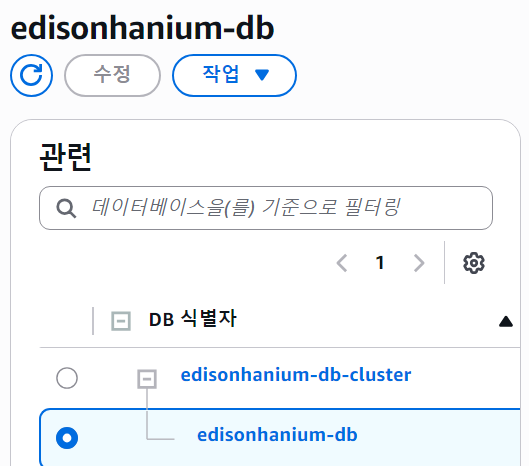
- 인스턴스는 별개로 새로 생성해서 공유된 AMI 선택하면 바로 생성되었다.
https://inchan.dev/posts/202306191507/ https://studydh.tistory.com/105 https://studydh.tistory.com/109 https://repost.aws/questions/QUUg8EMjYmQJGZwJCClJm3Sw/%EA%B8%B0%EC%A1%B4%EC%9D%98-rds%EB%A5%BC-%EB%8B%A4%EB%A5%B8-%EA%B3%84%EC%A0%95%EC%9D%98-rds%EB%A1%9C-%EB%B3%B5%EC%A0%9C%ED%95%A0-%EB%95%8C-restoring-db-instance-from-cross-account-storage-encrypted-snapshot-is-not-supported-%EB%AC%B8%EC%A0%9C-%EB%B0%9C%EC%83%9D?sc_ichannel=ha&sc_ilang=ko&sc_isite=repost&sc_iplace=hp&sc_icontent=QUUg8EMjYmQJGZwJCClJm3Sw&sc_ipos=9
- 근데 별개로.. com으로 인증서만 받아뒀는데 타겟그룹 & 로드밸런서 연결이 잘못된건지 com으로 접속하면 기존 site로 리디렉션 되게 해둔 것 같아서 aws 설정을 다시하는데에 시간을 은근히 많이 쏟았다. 마지막으로 conf 고쳐서 umcedison.site에서 com으로 전부 수정했고
- 깃허브 환경변수도 다시 집어넣었다… ^^
새 도메인 https 인증서 발급이 ㅜㅡㅜ
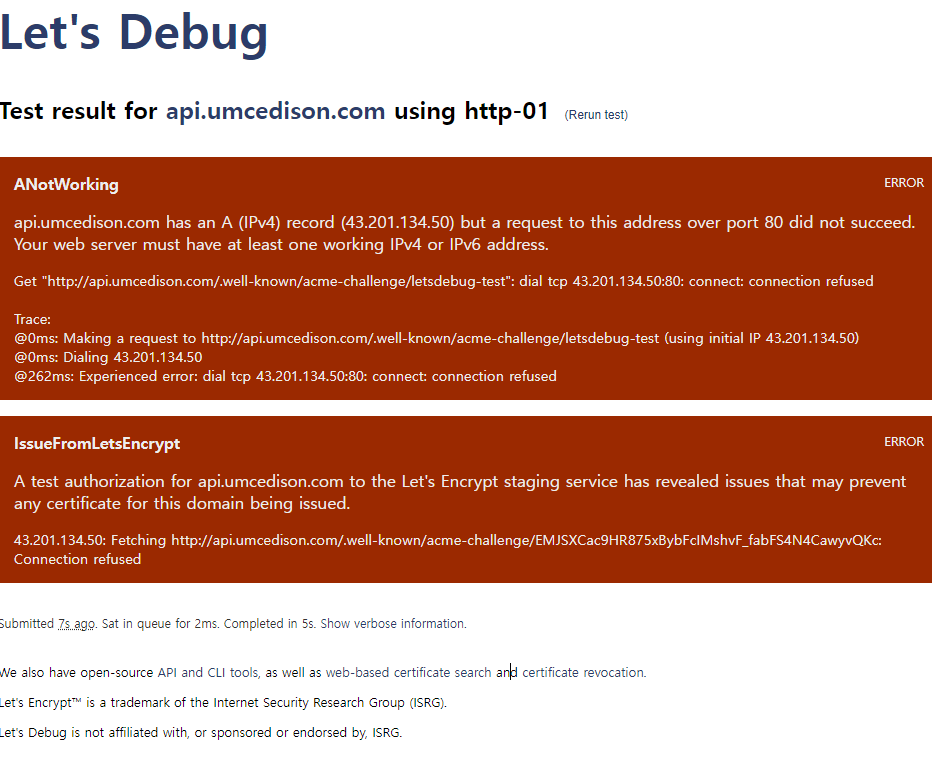
root@ip-10-0-4-11:/# dig @8.8.8.8 A [api.umcedison.com](http://api.umcedison.com/) dig @8.8.8.8 NS [api.umcedison.com](http://api.umcedison.com/) dig @8.8.8.8 CAA [api.umcedison.com](http://api.umcedison.com/) ; <<>> DiG 9.18.30-0ubuntu0.22.04.2-Ubuntu <<>> @8.8.8.8 A [api.umcedison.com](http://api.umcedison.com/) ; (1 server found) ;; global options: +cmd ;; Got answer: ;; ->>HEADER<<- opcode: QUERY, status: SERVFAIL, id: 34742 ;; flags: qr rd ra; QUERY: 1, ANSWER: 0, AUTHORITY: 0, ADDITIONAL: 1 ;; OPT PSEUDOSECTION: ; EDNS: version: 0, flags:; udp: 512 ; EDE: 23 (Network Error): ([205.251.196.49] rcode=REFUSED for [api.umcedison.com/a](http://api.umcedison.com/a)) ; EDE: 23 (Network Error): ([2600:9000:5307:cb00::1] rcode=REFUSED for [api.umcedison.com/a](http://api.umcedison.com/a)) ; EDE: 23 (Network Error): ([2600:9000:5301:2500::1] rcode=REFUSED for [api.umcedison.com/a](http://api.umcedison.com/a)) ; EDE: 23 (Network Error): ([205.251.194.162] rcode=REFUSED for [api.umcedison.com/a](http://api.umcedison.com/a)) ; EDE: 23 (Network Error): ([205.251.199.203] rcode=REFUSED for [api.umcedison.com/a](http://api.umcedison.com/a)) ; EDE: 23 (Network Error): ([205.251.193.37] rcode=REFUSED for [api.umcedison.com/a](http://api.umcedison.com/a)) ; EDE: 22 (No Reachable Authority): (At delegation [umcedison.com](http://umcedison.com/) for [api.umcedison.com/a](http://api.umcedison.com/a)) ;; QUESTION SECTION: ;[api.umcedison.com](http://api.umcedison.com/). IN A ;; Query time: 194 msec ;; SERVER: 8.8.8.8#53(8.8.8.8) (UDP) ;; WHEN: Tue Aug 19 09:30:54 UTC 2025 ;; MSG SIZE rcvd: 481 ; <<>> DiG 9.18.30-0ubuntu0.22.04.2-Ubuntu <<>> @8.8.8.8 NS [api.umcedison.com](http://api.umcedison.com/) ; (1 server found) ;; global options: +cmd ;; Got answer: ;; ->>HEADER<<- opcode: QUERY, status: SERVFAIL, id: 11980 ;; flags: qr rd ra; QUERY: 1, ANSWER: 0, AUTHORITY: 0, ADDITIONAL: 1 ;; OPT PSEUDOSECTION: ; EDNS: version: 0, flags:; udp: 512 ; EDE: 23 (Network Error): ([2600:9000:5307:cb00::1] rcode=REFUSED for [api.umcedison.com/ns](http://api.umcedison.com/ns)) ; EDE: 23 (Network Error): ([205.251.193.37] rcode=REFUSED for [api.umcedison.com/ns](http://api.umcedison.com/ns)) ; EDE: 23 (Network Error): ([205.251.196.49] rcode=REFUSED for [api.umcedison.com/ns](http://api.umcedison.com/ns)) ; EDE: 23 (Network Error): ([205.251.199.203] rcode=REFUSED for [api.umcedison.com/ns](http://api.umcedison.com/ns)) ; EDE: 23 (Network Error): ([205.251.194.162] rcode=REFUSED for [api.umcedison.com/ns](http://api.umcedison.com/ns)) ; EDE: 22 (No Reachable Authority): (At delegation [umcedison.com](http://umcedison.com/) for [api.umcedison.com/ns](http://api.umcedison.com/ns)) ;; QUESTION SECTION: ;[api.umcedison.com](http://api.umcedison.com/). IN NS ;; Query time: 205 msec ;; SERVER: 8.8.8.8#53(8.8.8.8) (UDP) ;; WHEN: Tue Aug 19 09:30:55 UTC 2025 ;; MSG SIZE rcvd: 419 ; <<>> DiG 9.18.30-0ubuntu0.22.04.2-Ubuntu <<>> @8.8.8.8 CAA [api.umcedison.com](http://api.umcedison.com/) ; (1 server found) ;; global options: +cmd ;; Got answer: ;; ->>HEADER<<- opcode: QUERY, status: SERVFAIL, id: 25291 ;; flags: qr rd ra; QUERY: 1, ANSWER: 0, AUTHORITY: 0, ADDITIONAL: 1 ;; OPT PSEUDOSECTION: ; EDNS: version: 0, flags:; udp: 512 ; EDE: 23 (Network Error): ([205.251.196.49] rcode=REFUSED for [api.umcedison.com/caa](http://api.umcedison.com/caa)) ; EDE: 23 (Network Error): ([205.251.199.203] rcode=REFUSED for [api.umcedison.com/caa](http://api.umcedison.com/caa)) ; EDE: 23 (Network Error): ([205.251.194.162] rcode=REFUSED for [api.umcedison.com/caa](http://api.umcedison.com/caa)) ; EDE: 23 (Network Error): ([205.251.193.37] rcode=REFUSED for [api.umcedison.com/caa](http://api.umcedison.com/caa)) ; EDE: 22 (No Reachable Authority): (At delegation [umcedison.com](http://umcedison.com/) for [api.umcedison.com/caa](http://api.umcedison.com/caa)) ;; QUESTION SECTION: ;[api.umcedison.com](http://api.umcedison.com/). IN CAA ;; Query time: 149 msec ;; SERVER: 8.8.8.8#53(8.8.8.8) (UDP) ;; WHEN: Tue Aug 19 09:30:55 UTC 2025 ;; MSG SIZE rcvd: 355- 애초에 api.umcedison.com이 접근이 안된다는 오류가 뜨기 시작함 An unexpected error occurred: Certification Authority Authorization (CAA) records forbid the CA from issuing a certificate :: Error finalizing order :: rechecking caa: During secondary validation: While processing CAA for api.umcedison.com: DNS problem: SERVFAIL looking up CAA for api.umcedison.com - the domain’s nameservers may be malfunctioning
https://letsdebug.net/api.umcedison.com/2531380
- 이유 찾은 것 같다

우분투야~ 이제 그만 속썩이고 엄마 말 잘듣는거야~
</figcaption></figure>
도메인을 애초에 산게 aws여서 네임서버도 그에 맞게 route 53에서 설정하게 되어있을 줄 알았더니(간과했다) 두개가 달라서 계속 servfail 왔던것 같고,, route 53 NS대로 구입한 도메인 네임서버 변경했다.
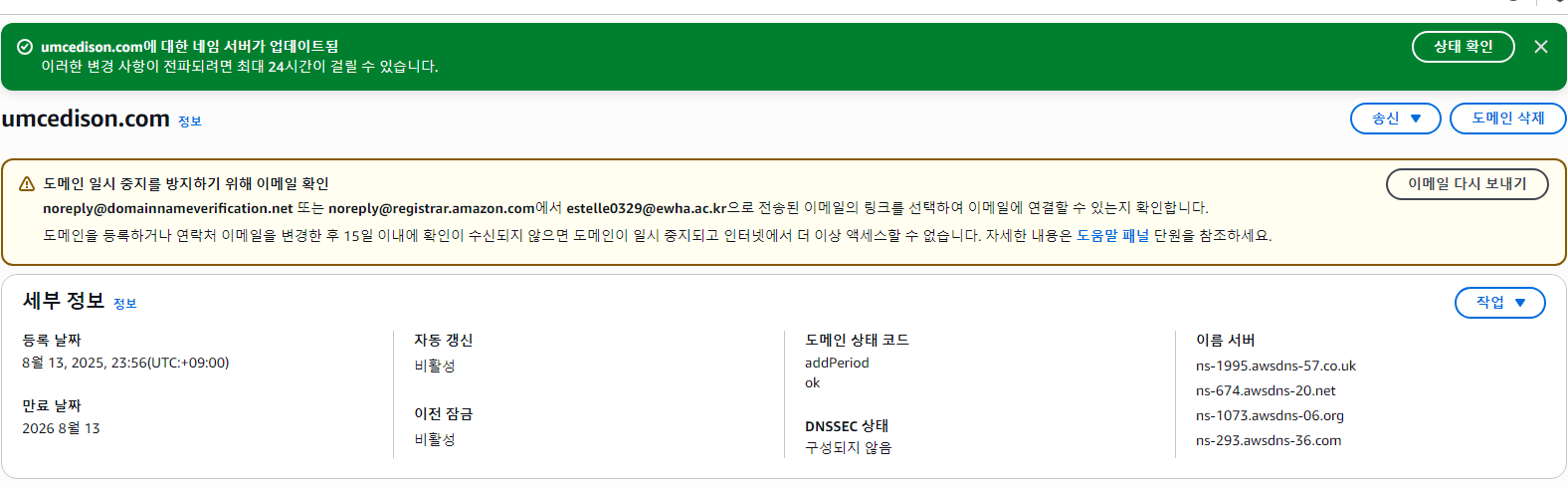
- 연결은 됐고
- 인증서 다시 받으면 되는데 sites available이랑 nginx.conf 콘솔에서 만지기가 두려워서 (콘솔이싫다)
- stand alone 모드로 받았다.
root@ip-10-0-4-11:/etc/nginx# sudo certbot --nginx -d api.umcedison.com
Saving debug log to /var/log/letsencrypt/letsencrypt.log
Error while running nginx -c /etc/nginx/nginx.conf -t.

nginx: [emerg] cannot load certificate "/etc/letsencrypt/live/api.umcedison.com/fullchain.pem": BIO_new_file() failed (SSL: error:80000002:system library::No such file or directory:calling fopen(/etc/letsencrypt/live/api.umcedison.com/fullchain.pem, r) error:10000080:BIO routines::no such file)
nginx: configuration file /etc/nginx/nginx.conf test failed

The nginx plugin is not working; there may be problems with your existing configuration.
The error was: MisconfigurationError('Error while running nginx -c /etc/nginx/nginx.conf -t.\n\nnginx: [emerg] cannot load certificate "/etc/letsencrypt/live/api.umcedison.com/fullchain.pem": BIO_new_file() failed (SSL: error:80000002:system library::No such file or directory:calling fopen(/etc/letsencrypt/live/api.umcedison.com/fullchain.pem, r) error:10000080:BIO routines::no such file)\nnginx: configuration file /etc/nginx/nginx.conf test failed\n')
root@ip-10-0-4-11:/etc/nginx# sudo systemctl stop nginx
sudo certbot certonly --standalone -d api.umcedison.com
sudo systemctl start nginx
Saving debug log to /var/log/letsencrypt/letsencrypt.log
Requesting a certificate for api.umcedison.com

Successfully received certificate.
Certificate is saved at: /etc/letsencrypt/live/api.umcedison.com/fullchain.pem
Key is saved at:         /etc/letsencrypt/live/api.umcedison.com/privkey.pem
This certificate expires on 2025-11-17.
These files will be updated when the certificate renews.
Certbot has set up a scheduled task to automatically renew this certificate in the background.

- - - - - - - - - - - - - - - - - - - - - - - - - - - - - - - - - - - - - - - -
If you like Certbot, please consider supporting our work by:
 * Donating to ISRG / Let's Encrypt:   https://letsencrypt.org/donate
 * Donating to EFF:                    https://eff.org/donate-le
- - - - - - - - - - - - - - - - - - - - - - - - - - - - - - - - - - - - - - - -
root@ip-10-0-4-11:/etc/nginx#
배포는 됐는데 502 에러뜨길래 앱안켜져있는지 봤더니
root@ip-10-0-4-11:/etc/nginx# ps aux | grep java
ubuntu     14976  169  6.6 3601388 262076 ?      Ssl  10:19   0:22 /usr/bin/java -jar /home/ubuntu/Edison-Server.jar
root       15009  0.0  0.0   7008  2432 pts/0    S+   10:19   0:00 grep --color=auto java
root@ip-10-0-4-11:/etc/nginx# sudo lsof -i :8080
root@ip-10-0-4-11:/etc/nginx#
역시나; java —jar로 실행해줬다.. (근데 왜 깃헙액션이 안돌려줬지) → org.hibernate.exception.SQLGrammarException: unable to obtain isolated JDBC connection [Unknown database ‘edison_db;’] [n/a]
db 못찾아서 오류터졌고 그래서 꺼진듯 하다 … ^^ jdbc:mysql://~~.rds.amazonaws.com:3306/edison_db 이렇게 액션에 넣어야되는데 뒤에 세미콜론 들어간듯 빼고 빌드 다시 실행해줬다.
댓글